What 12GB of VRAM actually gets you for local AI in 2026
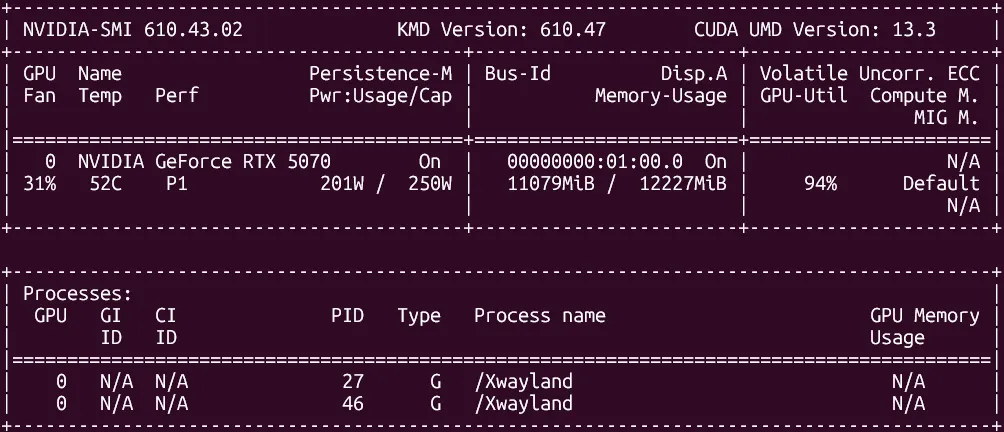
The RTX 5070 has 12GB of GDDR7. Most reviews of it talk about gaming. Most local-AI hardware guides talk about used RTX 3090s and 24GB minimums. There’s a gap in the middle — what does a current-gen consumer GPU actually deliver for someone running a serious local AI stack? — and I’ve spent enough time inside that gap to write about it honestly.
This is the first article on yorstack.dev because the hardware is the foundation everything else sits on. The full stack — Ollama, Open WebUI, n8n, a custom web search RAG pipeline, the Docker Compose layout that ties it all together — none of it works without an honest conversation about what the silicon can and cannot do.
This is that conversation.
The build
Just the parts that matter for AI:
| Component | Part | Role |
|---|---|---|
| GPU | NVIDIA RTX 5070 (12GB GDDR7) | Inference — model lives here |
| CPU | AMD Ryzen 7 9800X3D | Orchestration, Docker, sidecar containers |
| RAM | 32GB DDR5-6000 CL30 | Docker stack, system, spillover for MoE models |
Everything else — storage, monitor, peripherals — is irrelevant to this conversation. They make the machine usable; they don’t change what models will run on it.
The 12GB question
For local AI in 2026, 12GB is the line between “useful” and “limiting”. Below it, you’re running toy models. Above it, you start unlocking real capability.
Here’s what 12GB gets you in Ollama with Q4_K_M quantization (the default sweet spot for quality vs size):
| Model class | VRAM footprint | tok/s on RTX 5070 |
|---|---|---|
| 7B (Qwen 2.5 7B, Llama 3 8B) | ~5 GB | 109 |
| 14B (Qwen 2.5 14B, DeepSeek-R1 14B) | ~9–10 GB | 59–60 |
| 32B dense (Qwen 2.5 32B) | ~20 GB | won’t fit — fails to load |
| 35B-A3B MoE (Qwen 3.5 35B sparse) | ~22 GB | ~13 (partial RAM offload) |
The 14B class is where this card lives. That’s the practical operating range.
What’s actually running on it
My active model fleet in Ollama:
- qwen2.5:14b-instruct — default chat. Fast, instruction-following, no reasoning spirals.
- qwen2.5-coder:14b — code. Better structured output than general 14B for code tasks.
- deepseek-r1:14b — hard reasoning. Slow but correct. Used for architecture decisions, not chat.
- gemma3:12b — multilingual. Better Greek than any other local model I’ve tested.
- qwen3.5:35b-a3b — agent tool-calling only. MoE architecture, partially offloads to system RAM. Runs at ~13 tok/s, which is fine for agentic use — you’re waiting on tool calls, not generation.
- qwen2.5vl:7b — vision. The only 7B I’ve kept. Small enough to not crowd others out, specific enough to be useful.
Two models I tested and rejected:
- qwen3.5:9b — hidden thinking spirals. Slower wall-clock than the 14B instruct model on identical tasks, with worse output. Removed immediately.
- deepseek-r1:8b — hit a 40k token wall on a simple problem. The 14B version of DeepSeek doesn’t do this.
The honest constraint: VRAM is a hard ceiling
With 12GB, you’re managing a VRAM budget. Run ollama ps and you’ll see the model loaded plus its context footprint. The 14B models at Q4_K_M sit at ~9-10GB loaded. That leaves ~2GB headroom — enough for system processes and Docker, not enough to load a second 14B model simultaneously.
In practice: one model resident at a time. Ollama handles swapping automatically when you switch models, but swap means a cold load (few seconds) not an instant context switch.
For my use case — personal AI stack, not production inference — this is fine. For teams or concurrent use cases, 12GB would be a problem. That’s the honest answer.
Where 12GB breaks
Three scenarios where 12GB is a real constraint:
1. Dense models above 14B. A 32B dense model at Q4_K_M needs ~20GB. It won’t fit. Full stop. You can quantize further (Q2) and lose quality, or accept that 32B dense is out of range on this hardware.
2. Long context with large models. Running qwen2.5:14b at Q4_K_M with a 128k context fills VRAM fast. In practice I keep context windows reasonable and it works, but extended document analysis with large context is where you start hitting limits.
3. Multi-modal with large models. qwen2.5vl:7b works. Anything larger (13B vision models) won’t fit alongside other resident models.
Why the RTX 5070 specifically
GDDR7 memory bandwidth (448 GB/s on the 5070) matters more than raw VRAM size for transformer inference. Memory bandwidth determines how fast weights can be read per decode step — it’s the actual bottleneck, not compute. This is why a 12GB GDDR7 card is faster per token than some older 24GB GDDR6 cards, despite having less VRAM.
The practical effect: the 5070 punches above its VRAM capacity in tok/s terms. The 14B models that fit run fast. The tradeoff is that models that don’t fit, don’t fit — no amount of bandwidth helps you with insufficient VRAM.
The real question: is this enough for a production-grade local AI stack?
For a personal stack doing real work: yes, with discipline.
My full stack — Ollama inference, Open WebUI chat interface, n8n automation, a Docker Compose setup with a web search RAG pipeline (Playwright + Trafilatura sidecar + SearXNG) — all runs on this card alongside a gaming setup. It’s on 24/7. The inference is fast enough to use, the models are capable enough to be useful, and the per-token cost is zero.
The constraint I hit is model size, not throughput. If you need 32B+ dense models, this card won’t do it. If 14B class is sufficient — and for most practical local-AI use cases in 2026, it is — the RTX 5070 with 12GB is a legitimate choice, not a compromise.
What’s next
The next articles on yorstack.dev get into the specific stack setup — Docker Compose layout, the web search pipeline, how the pieces actually connect. The hardware article is the foundation. The stack is what makes it useful.